Dance lesson scheduling built around your teaching day
A ballroom studio day involves more than filling time slots. Private lessons, group classes, instructors and rooms all need to fit together. Ballroom Booking brings that work into one calendar so your team can see what is happening and plan the next step.
Generic calendars miss the parts that make ballroom different.
A moved private lesson can affect an instructor, a room, a couple, a package conversation, and the front desk handoff.
What Ballroom Booking does
What Ballroom Booking helps organize
Ballroom Booking keeps teaching work, service types, staff coordination, rooms, and owner visibility in one clearer daily view.
Why generic software falls short
Ballroom workflows carry context generic fitness tools usually miss.
Generic fitness calendars often stop at class slots. Ballroom scheduling has to carry private lessons, couples, rooms, parties, visiting coaches, instructor handoffs, and package conversations.
Couples and shared account context
Lesson packages and lessons remaining
Private lessons, groups, parties, staff, and rooms
Public offers, gift certificates, reporting, and follow-up
Your studio day
Start with your busiest day
Walk through a private lesson, a group class and a room change. Then look at the student and lesson package behind the booking. A useful demonstration should answer the questions your front desk actually gets.
Before you switch
Questions to bring to your walkthrough
Will this handle private lessons, rooms, parties, and instructor handoffs without becoming another generic calendar?
Scheduling view
Calendar work with ballroom context
A demo should follow the daily calendar across lessons, classes, parties, instructors, rooms, couples, and account context.
LessonPrivate lesson with instructor and room
ClassGroup class visibility
PartyEvent and service-type context
OwnerDaily schedule confidence
LessonsClassesRooms
Demo proof check
Ask to see this proof live.
Use the demo to connect lesson, class, party, owner to the real workflow your studio needs, then decide whether this belongs in the first rollout.
Confirm the screenshot matches the workflow your team needs
Trace the workflow from setup to the next front-desk or owner decision
Ask what should be verified before staff relies on it
Scheduling proof
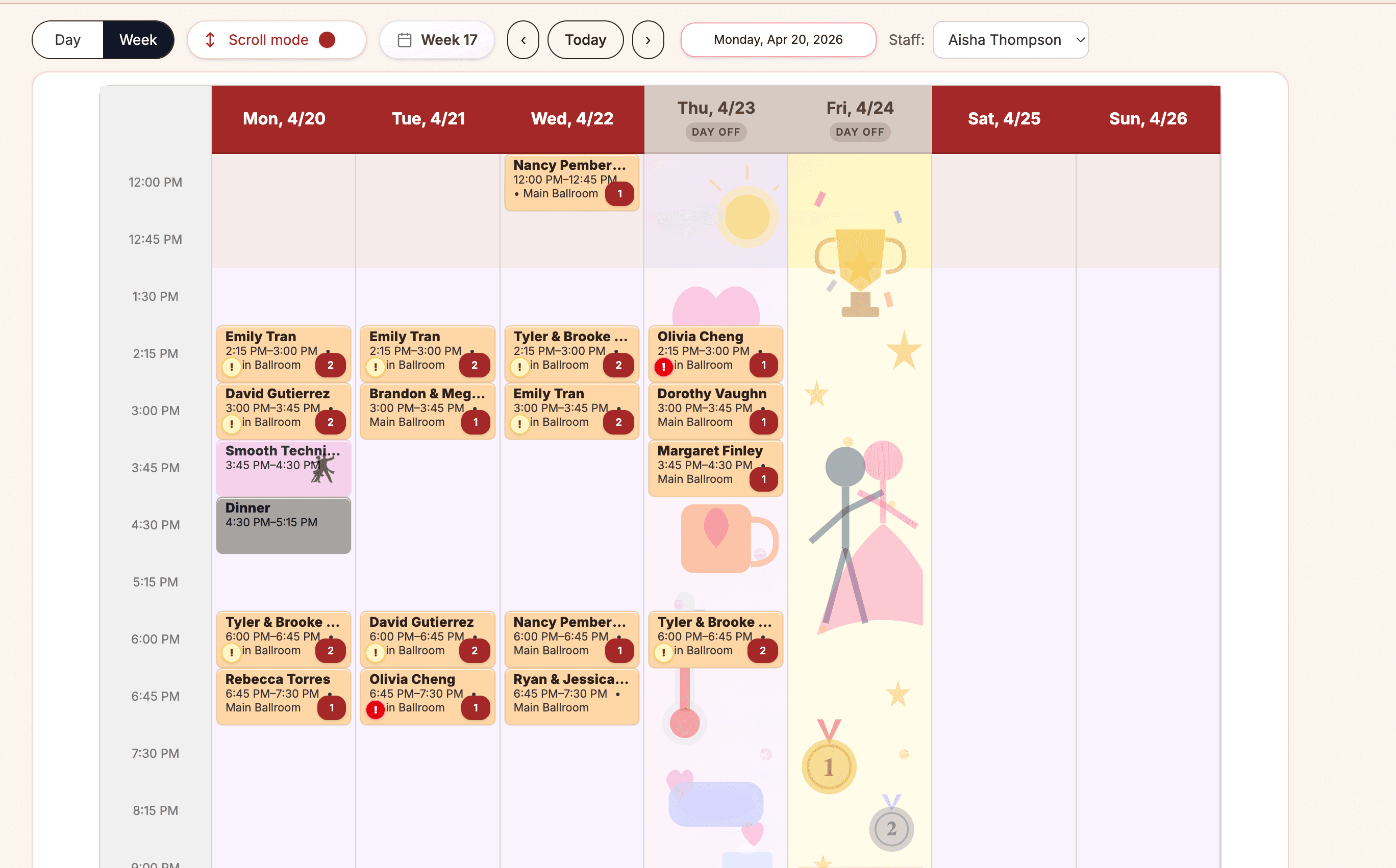
The calendar carries real ballroom context
Lessons, classes, staff, rooms, and special schedule days stay in one place.
What this screenshot shows
What this shows: a week view with private lessons, groups, and staff context
Private lessons, classes and staff context stay connected to the studio day
Use the demo to confirm instructors, rooms, private lessons, and package conversations fit your setup
Lesson package proof
Lesson packages should be visible before scheduling gets awkward.
A lesson package is a prepaid lesson bundle. Ballroom studios use packages because private lessons, intro plans, and renewals often depend on knowing what the student has left.
When lessons run low
Low balances should create a practical next-step conversation before the student runs out.
How staff sees it
Staff should be able to check remaining lessons close to the scheduling conversation instead of leaving the calendar to do balance math.
How ownership sees it
Owners should be able to spot low-balance moments before a student runs out and the renewal conversation becomes rushed.
Student, couple, and online visibility
Student or couple balance visibility and online package sales depend on enabled account, portal, payment, and checkout setup. Verify those paths in the demo before relying on them.
Why this matters in a ballroom studio
In a ballroom studio, the schedule is not just time slots. It is relationships, promises, instructor availability, rooms, parties, and the next conversation with a student.
Common workaround this replaces
Color-coded calendars, text threads, front-desk notes, and separate spreadsheets for rooms or instructor handoffs.
Owner benefit
What this changes for an owner
A cleaner schedule means fewer surprises and less fighting the system just to say a lesson happened.
Feature highlights
Private lesson and group class scheduling
Parties, showcases, instructors, and rooms in the same daily picture
Owner visibility for daily schedule confidence
A focused view for daily studio coordination
FAQ
Questions about scheduling.
Short answers for owners deciding whether this workflow belongs in the first demo conversation.
What should a dance studio booking system keep together?
Start with the lesson or class, the instructor and room, and the student's account. For ballroom studios, couple context and lesson-package balances matter too. In your demo, trace one booking through those connected views rather than judging only the calendar.
Is online lesson booking the same as the staff schedule?
No. Staff use the studio schedule to manage the teaching day. Student-facing booking depends on the studio's enabled portal or public introductory-lesson setup, instructor eligibility and availability. Confirm the exact student path in your demo; a calendar screenshot alone does not establish what students can book.
Is Ballroom Booking only for private lessons?
No. Scheduling is built around the mix ballroom studios actually manage: private lessons, group classes, parties, staff, rooms, and daily visibility.
Can a demo focus on our current calendar problems?
Yes. A useful demo should start with the schedule pressure your team feels most often.
Related workflows
Keep exploring the operating loop.
Most studios evaluate Ballroom Booking by following the pain from one real workflow into the next.